Filters are quite an important application in Electronics. You may want to filter out lower or higher frequencies, or perhaps a band in the middle. This is very important in audio systems (think bass etc), but also in for many other electrical components.
Passive Low pass
Low pass filters simply let the low frequencies “pass” while not letting through higher frequencies.
You can see if f increases the bottom part will get larger and as a result Xc will get smaller and smaller. This will make the capacitor have a lower impedance and thus a smaller voltage drop (X = U/I -> U = X * I) which means that Vout will be lower when increasing the frequency. This is the basic idea of a filter.
Gain
The difference between Vout and Vin is often defined in Gain (dB), you might recognize this scale from how loud sound is, but it is important to know that we are talking about voltages here, not directly sound.
Gain is defined as 20 log(Vout/Vin) where the 20 comes from the 45 degree slope that can be seen at the right of the image. 45 degrees ends up at -20dB/Decade where a decade is a factor 10 on a logarithmic scale. normal: 1, 10, 100, 100 decade: 1, 2, 3, 4
The cutoff frequency is the frequency at which
Cutoff frequency
The cutoff frequency Fc is the frequency at which the gain is -3db and the slope is exactly 45 degrees. This is is ultimately the magic that decides where your filter should start cutting off.
The cutoff frequency is defined as follows:
Where R is the resistor’s resistance and C is the Capacitance of the Capacitor
You will see this RC factor come back below
Time constant
The time constant t (greek tau) is defined as R * C.
This time constant is an indicator for the time needed to charge the capacitor. To be exact the time from 0 volts to approximately 63.2% (1-1/e) of the value of an applied DC voltage.
Many technical people always want to re-invent the wheel. “Operating systems are bloated” and all kinds of that stuff. I challenge you to make your own. (with a bit of help from this tutorial, i won’t leave you hanging 🙂 )
Tools
We are going to build a simle boot sector operating system. This is basically a operating system that fits in the first 512 bytes that the bios initializes when executing code on a disk.
To do this we will need 3 tools: – NASM: A x86 assembler to turn your assembly language into a binary file. – QEMU – Quick emulator. This can natively deal with your raw binary files and has text output – Any text editor, i like nano
On a linux debian-y based os, these can be installed with: apt -y install nasm qemu-system-x86 nano
Simple boot sector
jmp $   ; jump to current address - infinite loop

times 510-($-$$) db 0
     ; fill the empty space with zeroes

dw 0xaa55            ; write the magic bytes 55 aa at the end of our file.
This is a simple piece of assembly that will jump infinitely to the current address. This will not do much appart from spinning up your fans, but it will be a great start!
The middle line fills the empty space with zeroes. $ is an alias for the current line and $$ is the alias for the start of your program. So with 510-($-$$) you can pad the program to be exactly 510 bytes (and then 2 for the magic bytes following to make our 512) docs
As you can see, comments are added with the ; symbol. This works just like pyhon’s # or javascript’s //. It is smart to add plenty of comments to your assembly code as it will otherwise become quite hard to read.
We have to fill the last 2 bytes with 0xaa55 to show the BIOS that we have an operating system here. It wouldn’t be good if you started booting from your game storage disk would it?
Running our first program
Save your code to a file called boot.asm and then run
nasm boot.asm -f bin -o boot_sect.bin
to assemble boot.asm into a boot_sect.bin that your pc can understand. And then you can use
qemu-system-x86_64 boot_sect.bin -curses
To boot, -curses will emulate the vga text on your screen.
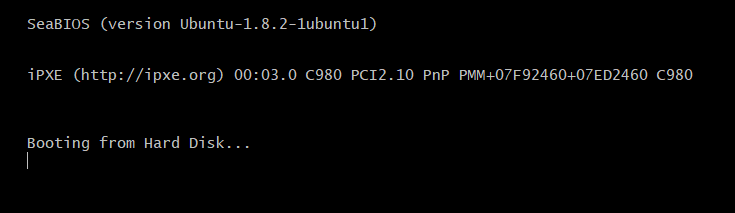
You should see the bios boot screen pop up and see one core shoot to 100% (your jmp loop)
You might not be able to ctrl-c/z out of this. If this is the case you can open a separate shell and kill the qemu process id: kill $(ps -ef | grep curses | awk '{print $2}' | head -n 1)
But thats just a bios boot screen?!
mov ah, 0x0e ; BIOS routine scrolling teletype

mov al, 'H' ; move byte for 'F' into the al register
int 0x10   ; execute the 0x10 "print to screen" interrupt
mov al, 'E'
int 0x10
mov al, 'L'
int 0x10
mov al, 'L'
int 0x10
mov al, 'O'
int 0x10
mov al, '!'
int 0x10


jmp $ ; freeze the screen so we can see our text


times 510-($-$$) db 0


dw 0xaa55 ; magic bytes
The code above will use a BIOS routine to print some text to your screen. Try it yourself and play around a bit with the text.
The code first loads the routine name into the AH register and then the ascii code for the letter in the AL register. Then it calls the 0x10 interrupt which tells the BIOS to use the AH and AL register to print something to the screen. You can find more on registers here. (absolutely worth reading after this article)
—
And then assemble and run:
Yay!
Logic
Right now we are just manually printing out registers, but it wouldn’t be a computer with some compute. So let’s do a simple calculation
mov ah, 0x0e ; BIOS text typing routine

mov al, '1' ; our text, to make it look better
int 0x10
mov al, ' '
int 0x10
mov al, '+'
int 0x10
mov al, ' '
int 0x10
mov al, '1'
int 0x10
mov al, ' '
int 0x10
mov al, '='
int 0x10
mov al, ' '
int 0x10


; We are upping the ascii code here, not the actual integer
mov cl, 49 ; ascii code for '1', make sure to use another 8 bit register
add cl, 1 ; after '1' comes '2'
mov al, cl ; move to the al register that is used for printing
int 0x10 ; print!


jmp $ ; freeze the screen so we can see our text

times 510-($-$$) db 0

dw 0xaa55 ; magic bytes
The import part here is the block right above the jmp $ instruction.
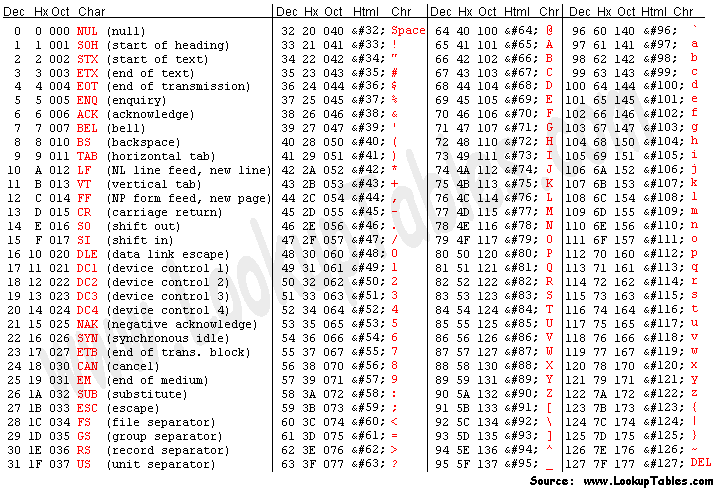
Old computers use what’s called an “ascii table”, this is basically a mapping between numbers (bytes) and letters.
As you can see, we start by moving the decimal number 49 into the cl (8 bit) register. In The table this corresponds to a ‘1’. Nasm also lets you move the actual character directly but that does the same thing under the hood.
The cool thing with ascii is that they are just numbers, you can increment 1 and get 2. But you can also increment 57 by one and end up with a “:”.
The order of arguments might be a mit misleading to anyone who has never worked with assembly. Generally we use the first argument as the destination, and the second as source. You can see this quite well in the add and mov instructions.
So let’s compile it and try!
yay!
Functions and loops
(WIP chapter) It would be a lot easier if we could print strings at once. Here’s a function that does just that!
Do not forget the org symbol, this mentions where the code/data of your program is located so you can use indirect addressing with square brackets.
Caveat: In This way of recursively calling yourself, the stack will not be restored when the null byte is called. How do we fix this?
[org 0x7c00]

mov ah, 0x0e ; BIOS text typing routine

mov bx, str
call printstring

freeze:
  jmp $ ; freeze the screen so we can see our text


printstring:
  pusha
  cmp byte [bx], 0 ; Stop when we see a null byte
  je freeze ; pop back variables when we've had all letters

  mov al, [bx] ; move contents of bx register to al register
  int 0x10 ; print!

  add bx, 1 ; move to the next letter

  call printstring ; recursively print all letters


str:
  db 'Hello, Wqrld!',0 ; terminate with \0


times 510-($-$$) db 0

dw 0xaa55 ; magic bytes
You can now print strings
And onwards…
You did it, you have now made your own very very very basic OS. The rest is up to you 😉
People have different ways of learning a new ecosystem or library. Some prefer to just start and look at the docs as they go, some like to read through all the examples that can be found online. I would like to add one thing to that list: Learning by porting an old program over to the newest version of your ecosystem.
But, what?
Programs get made and abandoned. Updates happen and things break. An old piece of software made for the same ecosystem that you are learning right now might not (won’t?) just compile.
The process of changing a piece of software made for one ecosystem to a similar but different one is called porting. This is often not as easy as it seems, even less so in low-level languages like C. (and if you go low enough, even C will seem “high-level”)
Why porting
When porting over a piece of software, you generally have to have a decent understanding of the software and ecosystem you are working with. When starting out you won’t have that.
But. When porting over a piece of software you will learn a tremendous amount about the tooling and common setups. When googling errors (which will absolutely come up) you will find the appropriate documentation and forums for your piece of software, and you will often find many common mistakes that you will now not have to make. An added bonus is that you will learn about both the old, and the new ecosystem. Learning the new ecosystem is obvious, but learning about the old ecosystem will also help a lot when you are working with older blog posts and pieces of software that you may or may not want to “steal” some code from.
As an added bonus, the open-source community will have a new updated version of the piece of software that you have worked on. Great!
DPDK
As an example i have recently been busy porting an old DPDK program over to a newer version of the library. I wanted to try and start by just writing out a basic program that would let me do what i wanted, but i immediately ran into trouble with outdated docs and undocumented missing libraries. After i got a simple version working i decided to try and port over an old program that i found on github. By doing this i was able to easily discern old functionality and the accompanying new improved version that i could also better understand the outdated documentation and use it to write newer programs.
Okay okay, i’ll give it a try.
This might not work for everyone, but i highly recommend you to try this method and see if it works for you. Good luck learning!
I’m always suprised how little most backend web devs don’t know about basic security measures. These are a couple ones i feel like every web dev must know how about:
word list: plaintext: normal human-readable text private key: a random string used in encryption encryption: using a private key to turn plaintext into something that can only read by others with that same key. hashing function: A cryptographic function that takes some information and outputs a hash. You might have heard of md5, sha256, or NTLM.
Password Hashing
You should absolutely never store plaintext passwords in your database. DBs get hacked, staff has to look in the db for maintenance, people re-use their passwords everywhere.
You could encrypt the password using a private key, but anyone with the private key can still easily decrypt and gain access to the passwords.
A better way is to use a technique called hashing. See this as one-way encryption. You can hash a plaintext password and check it to the hash stored in your database, but it can never be turned back into the original password. That information in just “lost”.
People then often start asking how in the world you are supposed to check if the password that the user supplied is correct. The anwser is simple: Just hash the user supplied password again and see if it matches the hash that was created during registration. As long as the input hash function, (salt), and password matches, they will always return the same output hash.
Think about it in the following way: theres multiple passwords that make for the same hash. The chance of this happening on accident or on purpose are extremely low, but still possible. thus making hashes more secure. E.g. hash("mycoolpassword") could theoretically equal hash("Thisisaverystrongpassword"). Since hashes are generally made to be quite “resource-intensive” it is not vible for an attacker to try every single password in existence, although this has been done for every combination of low-character-count passwords. These are called rainbow tables and can be downloaded online with filesizes in the terrabytes.
Salting and Peppers
A solution to these rainbow tables is called salting:
You can add a small string that is unique to every user (you might use their username, but its better to use something randomly generated) and use that in hashing: hash(password + salt). As long as this salt is unique to your application/user it won’t be as trivial to just lookup the resulting hash online.
Some applications also use something called a pepper, which is a application-wide salt that gets added to the per-user salt. This will make it even harder to crack if the attacker has both the hash and the salt, but it is generally seen as overkill.
Conclusion
Hashing is very important for any application that handles passwords. There are many more techniques that you should read about like CSRF, XSS, SQL injection. But i will leave them for what they are for now.
I’ve been trying to wrap my head around some statistics/data science used for dissecting ddos attacks, and came across a couple of new topics that are quite important but rarely explained.
Standard deviation is a property of a set that describes the spread around the mean.
Sx = σ = de standard deviation of the set Xi = The number i in the set. Xgem = the mean of the set Nx = the total number of elements in the set
σ = Sx = √( ∑ ( (xi – xgem)2 / nx) )
SRC: wiskunde.net
Z-score
z-score: easy normalized way of seeing if something is above the average or below, and if it is an outlier (z-score >3 | <3 is often seen as a outlier)
SRC: statistiekbegleider
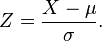
mean = average Z-score = (Measurement – mean) / stddev
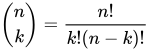
if we take n = 10 and k = 3 (also called 10 choose 3). We will find the outcome to be 120.
The newton Binomial is used to find the number of ways to choose k (three) elements out of n (10). Take for example the amount of combinations of toppings you can choose on a pizza when you can choose at most 3 from a total pool of 10 options.
note beforehand: Most of these ideas can be related to more common marketing tactics. A lot of this comes down to having players *trust* your server.
Keeping players – short term
Don’t overload them with information. People are here to play and not to read walls of signs. This will already drop their enthousiasm for a new server.
Have players online. Nothing screams run more than an empty server. This is ofcourse a catch-22. But a very important one to think about when for example making rules against afking.
Promote welcoming new players. This can absolutely make someone enthousiastic about finding a good community and will improve their chance of staying by a ton. You can start this by just welcoming new players when they join and you or another staff member are online. When other players see this they will copy the behaviour. You can also add certain funny welcoming commands with colors or send players a random “+1 karma” message.
Show people that you don’t have a reset coming any time soon. This is one of the most important things you can do for a lot of servers if you want to have long-term players.
Keeping players – long term
This one is harder, and also largely depends on how active your playerbase is.
Always. Always have something for your players to do. Something grindable is great for this (think walls for factions or farms), But you can also promote building cities or other bigger builds.
Events are a great way to pull many players at once including ones that initially stopped playing
Know how to handle griefing. Preferably without staff intervention. If players know beforehand that their building will stay up long-term they will invest more time in it. And in addition to that you won’t have anyone quitting over a griefed project that they put so many hours into. Rollbacking might be an option but sometimes people decide to quit before asking a staff member if something can be rolled back.
Make sure the difficulty scales well with playtime. This one is hard to get right but having a good start and then keeping some sort of difficulty when you go higher up in the game makes it entertaining for a longer time. While a lot of people like grinding there should still be challenges for them to tackle that aren’t too easy or too hard. Don’t make challenges that take a month to complete as people are not ready to invest that much time without some reward inbetween.
∪ = union, Everything in A AND everything in B (including overlap) ∩ = intersection, Everything in A AND B (just the overlap) A \ B = {x | x ∈ A and x ∈ B} = Everything in A but not in B
A ∈ B = A is part of B (smaller side of ∈ towards the smaller set) Q.E.D. = Proof done (normally a block symbol, but wordpres….) P iff Q = P if and only if Q = P ↔ Q) = P implies Q and vice-versa
∩ intersection (wikipedia)
Set proof (both statements imply eachother)
With set A,B,C:
A ∩ (B ∪ C) = (A ∩ B) ∪ (A ∩ C) the intersection of A with (B andor C) = (The intersection between A and B) andor (the intersection between A and C)
This looks correct, but let’s prove it.
Proof. We show that z ∈ A ∩ (B ∪ C) implies that z ∈ (A ∩ B) ∪ (A ∩ C) and vice-versa.
First, we show that z ∈ A ∩ (B ∪ C) implies that z ∈ (A ∩ B) ∪ (A ∩ C):
Assume that z ∈ A ∩ (B ∪ C). Then z is in A and z is also in B or C. Thus, z is in either A∩B or A∩C, which implies z ∈ (A∩B)∪(A∩C)
——-
Now, we show that z ∈ (A∩B)∪(A∩C) implies that z ∈ A ∩ (B ∪ C).
Assume that z ∈ (A ∩ B) ∪ (A ∩ C). Then z is in both A and B or else z is in both A and C. Thus, z is in A and z is also in B or C. This implies that z ∈ A ∩ (B ∪ C).
Q.E.D.
Proof by contradiction
Proof by contra-positive ((P → Q) ↔ (¬Q → ¬P) is a tautology. )
In order to prove a proposition P by contradiction:
Write, “We use proof by contradiction.”
Write, “Suppose P is false.”
Deduce a logical contradiction.
Write, “This is a contradiction. Therefore, P must be true.”
Theorem: sqrt(2) is irrational
proving something irrational is hard, so instead assume it to be rational:
sqrt(2) = a/b (in the lowest terms a and b possible) 2 = (a^2)/(b^2) a^2 = 2(b^2) which means a^2 is even thus a is even thus a^2 is a multiple of 4 thus b^2 is a multiple of 4 thus b is also even
a and b are even which is a contradiction with the lowest term rule thus a/b is not rational
The rant of my life. Someone wants to sell you something that they’ve created, loved and cared for.
Please be decent customer. This seller (hopefully) isn’t just here to take your money. They have something you need and are happy to give it to you.
This also works the opposite way. Be a good seller. We are in this world together, for whoever’s sake please don’t just apply shitty tricks from the book to get more money. What is your goal in life? I hope happiness. Do those 20 extra bucks make you happier? Yes, maybe. But does that add up to a constant feeling of happiness just being friendly to people, offering them something you care about and having them be friendly back. Look at village cafés that are always full of people. A good mood and care brings one way further than pushing every client to pay those 3 bucks extra.
Some things i’ve come around over the years that i had to look up.
CapEx – capital expenditure > money spent at once as an investment OpEx – operational expenditure > money spent on a recurring basis
USP – unique selling point > Something you can offer to customers that noone else does.
B2B – Selling to other businesses B2C – Selling to consumers
ROAS – Return on ad spent > How much do you earn for every dollar spent on ads. ROI – Return on investment > How much do you earn back for every dollar spent as an investment.
KPI – key performance incators > Statistics that show how good your business is doing.
R&D – Research & Development > Area of your business dealing with creating and improving products.
A/B Testing – Testing multiple version of a page to see which one gains more conversions CTR – Click through rate > How many people click through to another page or on your ad.
PPC – Pay per click > Paid ads SEO – Search engine optimization > Organic traffic through google CRO – Conversion rate optimization > Trying to get more conversions as a percentage of visitors.
COR – Cost of revenue > the cost of producing and delivering a product to customers, excluding indirect costs such as marketing and R&D. The part of expenses that doubles if the number of sales doubles.
These are some things to try when it comes to b2b marketing.
Networking
Referrals are everything in B2B. The largest amount of jobs comes from previous employers or friends. This is even more true for government jobs.
Social media
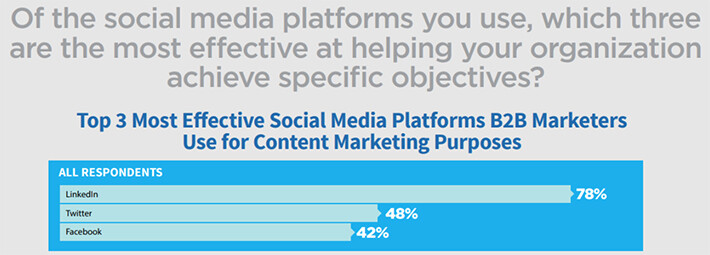
Make social media accounts, linkedin, facebook, twitter, instagram. Respond to posts of other companies and post your own content that may help other people so your posts get shown to more people that will recognize your name and may convert.
Well. the above. Find long-tail keywords without too much competition and start with those.
PPC
paid ads suck but might be worth a try. Think google’s banner ads. Search engine ads, facebook/insta. Or maybe one of your niche’s forums. Retargeting also makes this quite a bit more useful.
Sponsor popular projects.
If your niche has projects that are used by a lot of people that might also be interested in your product, pay for their needs and offer them your infrastructure. Referrals from a project owner or banners on popular projects are a great way to gain more clients.
Linkedin marketing
Linkedin is still he home of businesses, post messages, connect with others and learn about the market and demands.
Build a mailing list
Email is dead… But still useful. As long as you deliver emails that people actually read they can be a great way to keep an audience in on your company. Make these emails entertaining and full of information. Keep in mind most people don’t care about your company, they care about their own.
Already have forgotten it by the time they get to the next mail in their mailbox.
For the love of god please don’t just send e-mails whenever you do an acquisition or seeding round. Yes bigger companies might gain slightly more trust if you have the funds but will already have forgotten it by the time they get to the next mail in their mailbox. Get someone’s interest and make them memorable.
Advertise on more niche platforms.
Be active on platforms like discord if your target demographic is mainly younger audiences or make sure you are active on forums in your area. Think of hosting forums, electrical support, etc etc. These people have demands in your area and helping them increases your brand awareness and trust by a lot. Even when someones comes across your post x years in the future.
Do you have more tips that worked for your company? Please suggest them in the comments so i can improve this guide.